For equipment service teams

See which CISA medical-device advisories your client sites should check.

CISA, the US cybersecurity agency, publishes public advisories about security problems in medical devices, called ICS medical advisories (ICSMA). We compare each client site’s equipment list with them and list the possible matches your team should check, graded by how closely they line up. Run it once, or add it to Recall Watch and we check every site each month.

Built for Independent service organizations (ISOs) and multi-site biomed / HTM teams.

See a sample check first

How it works

  1. Send one export

    Export one client site’s asset list from your CMMS (CSV or Excel). A software or firmware version column helps but is not needed. No patient data.

  2. Get the check in 72 hours

    Every CISA medical advisory released or revised in the last 24 months, compared with your devices. Each possible match is graded: model match, or manufacturer match only.

  3. Confirm, then keep watching

    Your team confirms versions with the manufacturer. If it’s useful, add it to Recall Watch: we check every site each month and mark new and revised advisories.

What it checks

  • Every CISA ICS medical advisory (ICSMA) released or revised in the last 24 months
  • Manufacturer and model names from your CMMS export, using the same alias table as our recall checks
  • A software or firmware version column, if your file has one (shown as a note to confirm)

Recall checks and Recall Watch cover FDA recalls only. This is the separate check for CISA’s security advisories: run it once, or add it to Recall Watch.

Equipment lists only. No patient information.

What you get

Possible matches, graded and quoted

The same recall tool runs the check, with its advisory module switched on. This is its real output, run on a fictional client’s equipment list against CISA’s public advisories.

Security advisory check

Every possible advisory match, graded by how closely it lines up

A model match means the manufacturer and model name line up with a product named in the advisory: confirm the software or firmware version on those units. A manufacturer match only means only the manufacturer lines up: check whether any of your models are on its list. CISA’s titles are shown as quotes, with the advisory ID, CVEs, highest CVSS score and a link.

Request the free check

Sample · Fictional Data*

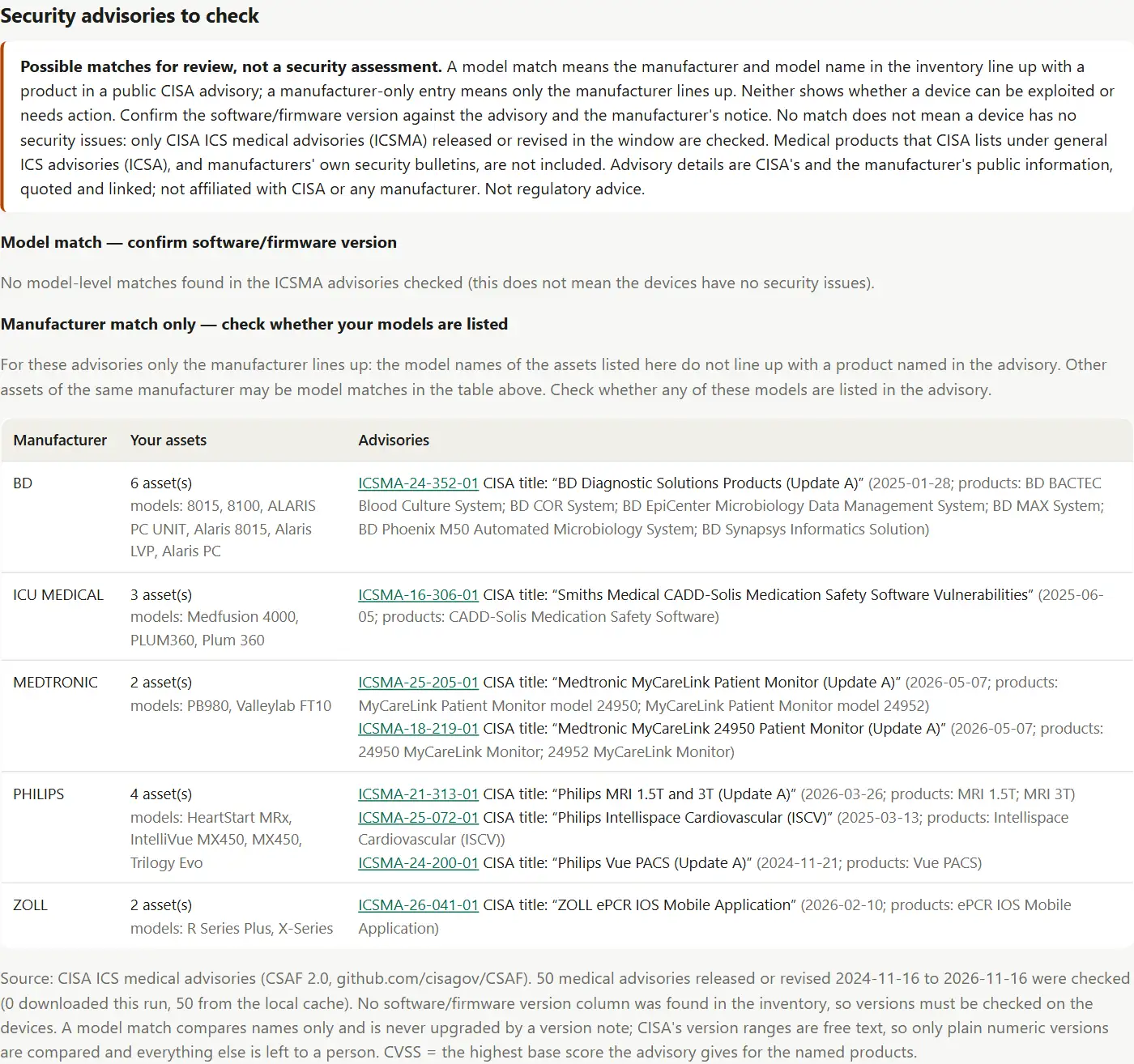
Sample security advisory check for a fictional clinic: 50 CISA ICS medical advisories released or revised in the last 24 months were checked. 0 are model matches to confirm by software or firmware version, and 8 advisories for 5 manufacturers are a manufacturer match only, to check whether the clinic's models are listed. Up to three are shown (BD, Philips and ZOLL), each with the advisory ID, CISA's title in quotes, the number of CVEs and the highest CVSS score. The report says these are possible matches for review, not a security assessment.
Offers and prices

Start free

Free Security Advisory Check

Free

1 site · report in 72 hours · no commitment

Send a CMMS export from one client site, with the free recall audit or on its own. Within 72 hours you get the possible advisory matches to check.

  • Every CISA ICS medical advisory (ICSMA) released or revised in the last 24 months
  • Each possible match graded: model match (confirm the software/firmware version) or manufacturer match only (check whether your models are listed)
  • CISA’s advisory ID, title, CVEs, highest CVSS score and link for each one
  • A report section plus a spreadsheet, with the caveats on every row

Start free

Advisory add-on for Recall Watch

$15 per site per month billed annually ($180 per site per year)

Security advisories added to each site’s monthly Recall Watch report, under your brand.

  • Monthly matching of new and revised CISA medical advisories against every client site
  • NEW advisory matches marked, and advisories CISA has revised (for example “Update B”) listed
  • In the same branded monthly report as your recall matches
  • For sites on a Recall Watch plan

Payment: Billed annually per site, in advance, alongside your Recall Watch plan.

Add to Recall Watch

Recall Watch on its own covers FDA recalls only. Add the advisory add-on to the same sites to get both in one monthly report.

How payment works

  • Invoiced in US dollars (USD).
  • Pay by US bank transfer (ACH) or international wire.
  • Card payments are available on request and add 3%.
  • Quotes are valid for 30 days.
  • Invoices are due within 14 days. Deliverables are released on payment.

Example

See what you get

A real output from the tool we use, run on a fictional client’s equipment list. The device models and CISA advisories in it are public data. Every entry is a possible match for review, not a finding: your qualified staff confirm each one with the manufacturer.

Sample · Fictional Data* Sample security advisory check for a fictional clinic: the caveat box (possible matches for review, not a security assessment), no model matches, and a table of manufacturer-only matches for BD, ICU Medical, Medtronic, Philips and ZOLL, each with CISA advisory IDs and quoted CISA titles.

Free Security Advisory Check. 50 CISA medical advisories from the last 24 months checked against a fictional clinic’s 28 devices: no model matches, and 8 advisories for 5 manufacturers to check whether the clinic’s models are listed.

Open the sample report at full size (image, 1400 pixels wide)

Download the sample advisory spreadsheet (CSV, 8 rows, 8 KB, fictional client)

* All samples use fictional data. Client files are confidential: they are never shown publicly or reused in samples.

What happens after you send a request

  1. You get a reference number

    It appears on screen as soon as you send the form, for example BBL-2026-0042. With it and your email you can follow progress on the status page. No account or password.

  2. We read it and reply

    We reply within 2 business days. We look at your request and any file you sent, and ask if anything is unclear. The free advisory check report follows within 72 hours.

  3. You approve a written quote

    Paid work starts only after you accept a written quote with the scope, price, timeline and payment terms. Quotes are valid for 30 days, and you can simply decline.

  4. Your files come back through the portal

    Reports and files are downloaded from the status page with your reference number and email.

Known limits

We would rather tell you now than have you find out later:

  • Only CISA ICS medical advisories (ICSMA) are checked. Medical products that CISA lists under general ICS advisories (ICSA), and manufacturers’ own security bulletins, are not included.
  • Equipment lists rarely show software or firmware versions, so every match is a possible match for your team to confirm against the advisory and the manufacturer’s notice.
  • Model ranges in an advisory, such as “MX400-MX850”, are not expanded. Those devices show as a manufacturer match only, so they still get checked.
  • CISA’s machine-readable advisory files appear about a day after its web page, so the data can be up to about 2 days behind cisa.gov.

Disclaimer. Possible matches for review, not a security assessment. A model match means the manufacturer and model name in the inventory line up with a product in a public CISA advisory; a manufacturer-only entry means only the manufacturer lines up. Neither shows whether a device can be exploited or needs action. Confirm the software/firmware version against the advisory and the manufacturer’s notice. No match does not mean a device has no security issues. We use public CISA data and are not affiliated with CISA or any manufacturer. Not regulatory advice.

Questions

What is an ICSMA advisory?

CISA, the US Cybersecurity and Infrastructure Security Agency, publishes public advisories about security problems in industrial and medical products. The medical ones are numbered ICSMA, for example ICSMA-24-352-01. Each names the manufacturer, the products and versions, the CVEs and what the manufacturer recommends.

Is this a security assessment?

No. We compare names in your equipment list with names in public advisories. A match does not show whether a device can be exploited or needs action, and no match does not mean a device has no security issues. It tells your team where to look first.

Will the report say a device is at risk?

No. Our own wording only ever says “possible match” and what to confirm. Words from CISA’s titles and advisory text are always shown in quotation marks, as CISA’s words.

Why are versions not checked?

Most CMMS exports have no software or firmware version. If yours has a version column, the report shows each listed version next to the advisory’s range as a note, but the grade never changes because of it: a person confirms the version on the device.

Does Recall Watch include this?

No. Recall Watch covers FDA recalls only. The advisory add-on puts this check in the same monthly report for the same sites, for $15 per site per month.

Which advisories are not covered?

Medical products that CISA lists under general ICS advisories (ICSA) instead of ICSMA, such as some Siemens Healthineers products, and manufacturers’ own security bulletins. The report says this at the top of the section.

Do you need patient data?

No. We only need equipment records: asset ID, manufacturer, model, serial and department, plus a version column if you have one. Please remove anything that identifies a patient before you send a file.

Are you connected to CISA?

No. We use CISA’s public advisory files and link to CISA’s pages. We are not affiliated with CISA or any manufacturer.

Start here

Choose your path

Every service has a free first step. Paid work starts only after you accept a written quote.

For equipment service teams: Security Advisory Watch

  • Start free

    Free Security Advisory Check

    Free

    Send a CMMS export from one client site, with the free recall audit or on its own. Within 72 hours you get the possible advisory matches to check.

  • Advisory add-on for Recall Watch

    $15 per site per month

    Security advisories added to each site’s monthly Recall Watch report, under your brand.

Not sure? Ask a questionCompare every priceSee all services